
GLM Coding Plan Monitor
Chrome 扩展,监控智谱 GLM Coding Plan 配额与用量
Chrome 扩展Vue 3TypeScript
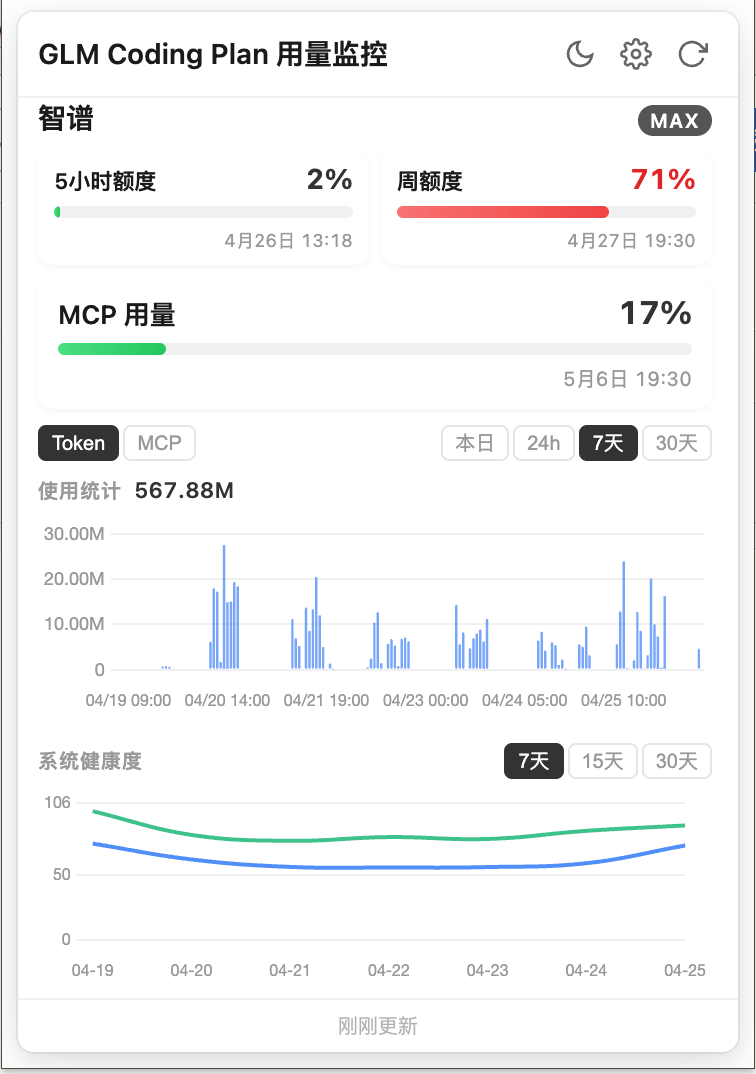
Chrome Extension for monitoring Zhipu GLM Coding Plan quotas, token usage, MCP tool calls, and model performance — right from your browser toolbar.
Features
| Feature | Description |
|---|---|
| Quota Dashboard | Real-time token quota, MCP tool limits, with progress bars and color-coded thresholds |
| Token Usage Charts | Stacked bar charts for daily / 7-day / 30-day token consumption, broken down by model |
| MCP Tool Analytics | Visual breakdown of Search, Web Read, and ZRead tool usage across time ranges |
| Model Performance | Line charts tracking ProMax & Lite decode speed and success rate over 7/15/30 days |
| Multi-Account | Monitor multiple GLM accounts simultaneously, switch with one click |
| Badge Indicator | Toolbar badge shows remaining quota percentage with green/yellow/red color alerts |
| Auto Refresh | Configurable interval via chrome.alarms — data stays fresh without manual intervention |
| Dark Mode | Light / Dark / System-auto theme switching |
| i18n | Chinese & English interface, switch anytime |
安装方法(开发者模式加载)
- 点击上方「⬇ 下载」获取
glm-coding-plan-monitor-v1.0.0.zip并解压到一个固定目录(加载后请勿删除) - 打开 Chrome,地址栏输入
chrome://extensions/ - 打开右上角「开发者模式」开关
- 点击「加载已解压的扩展程序」,选择刚才解压出来的文件夹(含
manifest.json的那一层) - 扩展固定到工具栏,点击图标登录 GLM 账号即可查看用量
Setup API Key
- Click the extension icon in the Chrome toolbar
- Click the Settings gear icon (top-right of popup)
- Paste your GLM API Key — you can get one from open.z.ai
- Click Save — data will start refreshing automatically
Build from Source
git clone https://github.com/Ethanzyc/glm-coding-plan-monitor.git
cd glm-coding-plan-monitor
npm install
npm run build
Then load the dist/ folder as an unpacked extension in Chrome.
Architecture
Chrome Extension
├── Popup UI (Vue 3 SPA)  ←→  Service Worker
│                                 ├── Scheduler → Aggregator → Zhipu API (api.z.ai/monitor)
│                                 └── Badge Manager → Toolbar Badge
└── 数据流: chrome.runtime.sendMessage 在 Popup 与 Service Worker 间通信
Tech Stack
- Vue 3 + TypeScript — Popup SPA with Composition API
- Vite 6 — Build toolchain with plugin-based extension file copy
- Chart.js + vue-chartjs — Token, MCP, and performance visualizations
- vue-i18n — Multi-language support (zh-CN / en-US)
- Chrome Extension Manifest V3 — Service worker background,
chrome.alarmsscheduling,chrome.actionbadge
Acknowledgements
This project is a Chrome extension adaptation of coding-quota-bar by @hyizhou, an Electron + Vue 3 desktop app for multi-platform AI coding plan monitoring. The core data layer, chart components, and i18n are adapted from that project.
Links
- GitHub: https://github.com/Ethanzyc/glm-coding-plan-monitor
- Gitee(国内镜像): https://gitee.com/Ethanzyc/glm-coding-plan-monitor
MIT License.